

At Realhaus, trust forms the foundation of our community, connecting thousands of people across Canada as they rent and manage properties based on trust in each other.
A crucial element of fostering this trust is verifying our users’ identities. Our identity verification process involves a series of steps to ensure that everyone in our community is authentic, allowing users to feel secure when using Realhaus. Every Owner, Tenant, and service provider must complete identity verification to access our platform.
While no system is flawless, this process helps reduce fraudulent activity, enhance safety, and support genuine, meaningful interactions within our community.
Identity Verification
Verifying your identity means verifying certain personal information, such as your legal name, address, date of birth, phone number, or other contact details, against a valid government-issued ID.
To begin the identity verification, visit the personal info page at app.realhaus.ca/account/personal-info and complete the form fields. Save the form once you have completed all fields.
Verify Government-issued ID
After completing the personal information, you need to verify your government-issued ID. Ensure the information you provided in the personal info form matches the information in your government-issued ID.
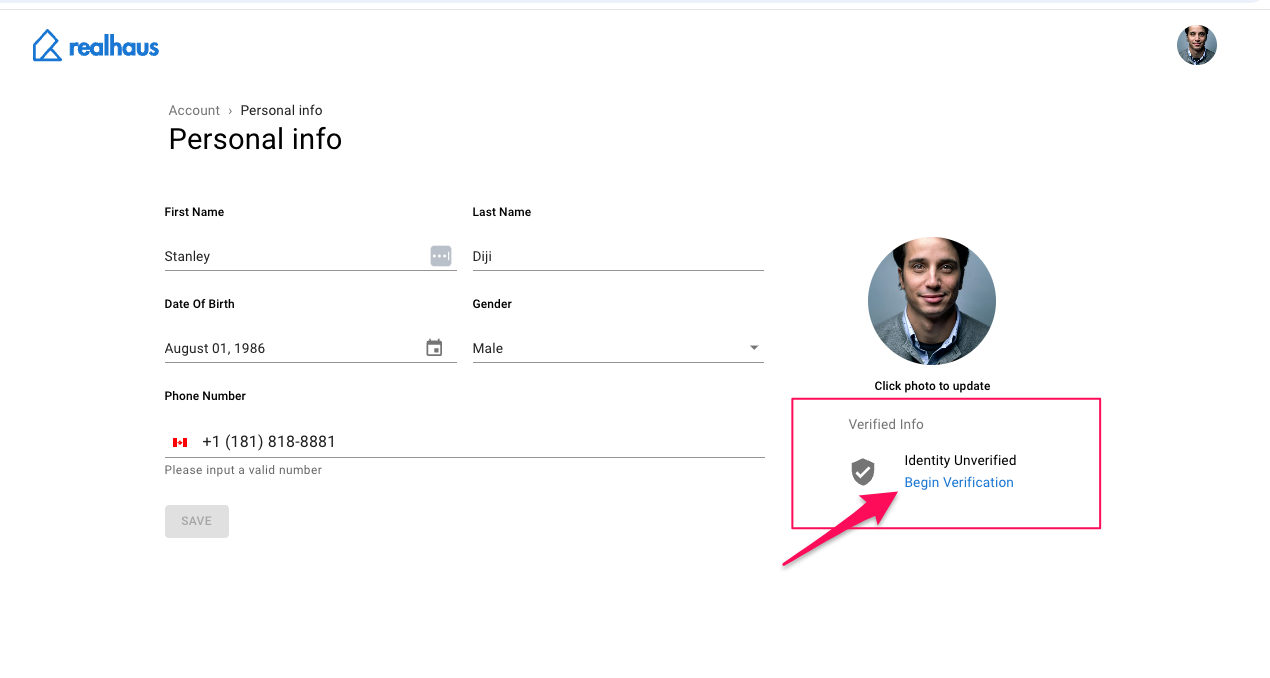
To verify the government-issued ID, click the Begin Verification link below the profile picture section. You will be presented with a self-guided identity verification popup.
The list of allowed Canadian government-issued IDs for verification are:
- Drivers License
- Healthcare Insurance Card
- National ID
- Passport
- Permanent Resident Card
If you do not have a Canadian government-issued ID, you can complete the verification with a valid government-issued ID from a different country.